이번엔 달리기 시스템을 만들 것이다.

달리기 시스템은 플레이어가 마우스 좌클릭을 했을 때, 발걸음 속도가 빨라지고, 다시 뗐을때 원래 속도로 돌아오게끔 한다.
InputController
먼저 좌클릭을 클릭했을 때와 뗐을 때 입력을 만들어 줘야한다.
using System;
using UnityEngine;

public class InputController : Singleton<InputController>
{
    [SerializeField] Vector2 mousePos; // 마우스포인터 위치
    public Vector2 MousePos => mousePos;

    // 마우스 좌클릭 이벤트
    public event Action MouseLeftDown;
    public event Action MouseLeftUp;

    protected override void Awake()
    {
        base.Awake();
    }
    // Update is called once per frame
    void Update()
    {
        Mouse_Pos();
        Mouse_L();
    }
    // 마우스 좌클릭
    void Mouse_L()
    {
        if (Input.GetMouseButtonDown(0))
        {
            MouseLeftDown?.Invoke();
        }
        else if (Input.GetMouseButtonUp(0))
        {
            MouseLeftUp?.Invoke();
        }
    }
}
Update에서 if문으로 bool 값을 사용하여 현재 클릭상태인지 아닌지를 판단하는 코드를 사용하려 했지만 Event Driven 아키텍처에 맞게, 눌렀을 때와, 뗏을 때 각각 이벤트를 호출하는 식으로 만들어주었다.
만약 좌클릭을 클릭하면 MouseLeftDown 델리게이트를 호출하고, 좌클릭을 떼면 MouseLeftUp 델리게이트를 호출한다.
FPMovement
입력에 따라 발걸음을 제어하는 행동을 구현할 것이다.
using System.Collections;
using Unity.VisualScripting;
using UnityEngine;
using UnityEngine.AI;

public class FPMovement : MonoBehaviour
{
    [SerializeField] InputController input_C; // 입력 컨트롤러
    private NavMeshAgent agent; // 발자국 Nav
    [SerializeField] float maxSpeed; // 최대 속도
    [SerializeField] float walkSpeed; // 걸음 속도

    private void Awake()
    {
        footPrintRb = footPrint.GetComponent<Rigidbody2D>();
        agent = footPrint.GetComponent<NavMeshAgent>();
    }
    void OnEnable()
    {
        InputController.Instance.MouseLeftDown += SpeedIncrease;
        InputController.Instance.MouseLeftUp += SpeedDecrease;

    }
    private void OnDisable()
    {
        InputController.Instance.MouseLeftDown -= SpeedIncrease;
        InputController.Instance.MouseLeftUp -= SpeedDecrease;
    }
    // 발자국 움직임
    void FootPrintMove()
    {
        agent.SetDestination(input_C.MousePos);
    }
    void SpeedIncrease()
    {
        agent.speed = 7;
        walkSpeed = 0.3f;
    }
    void SpeedDecrease()
    {
        agent.speed = 3.5f;
        walkSpeed = 0.5f;
    }
    ~~~~~~~~~~~~~~~~~생략~~~~~~~~~~~~
}
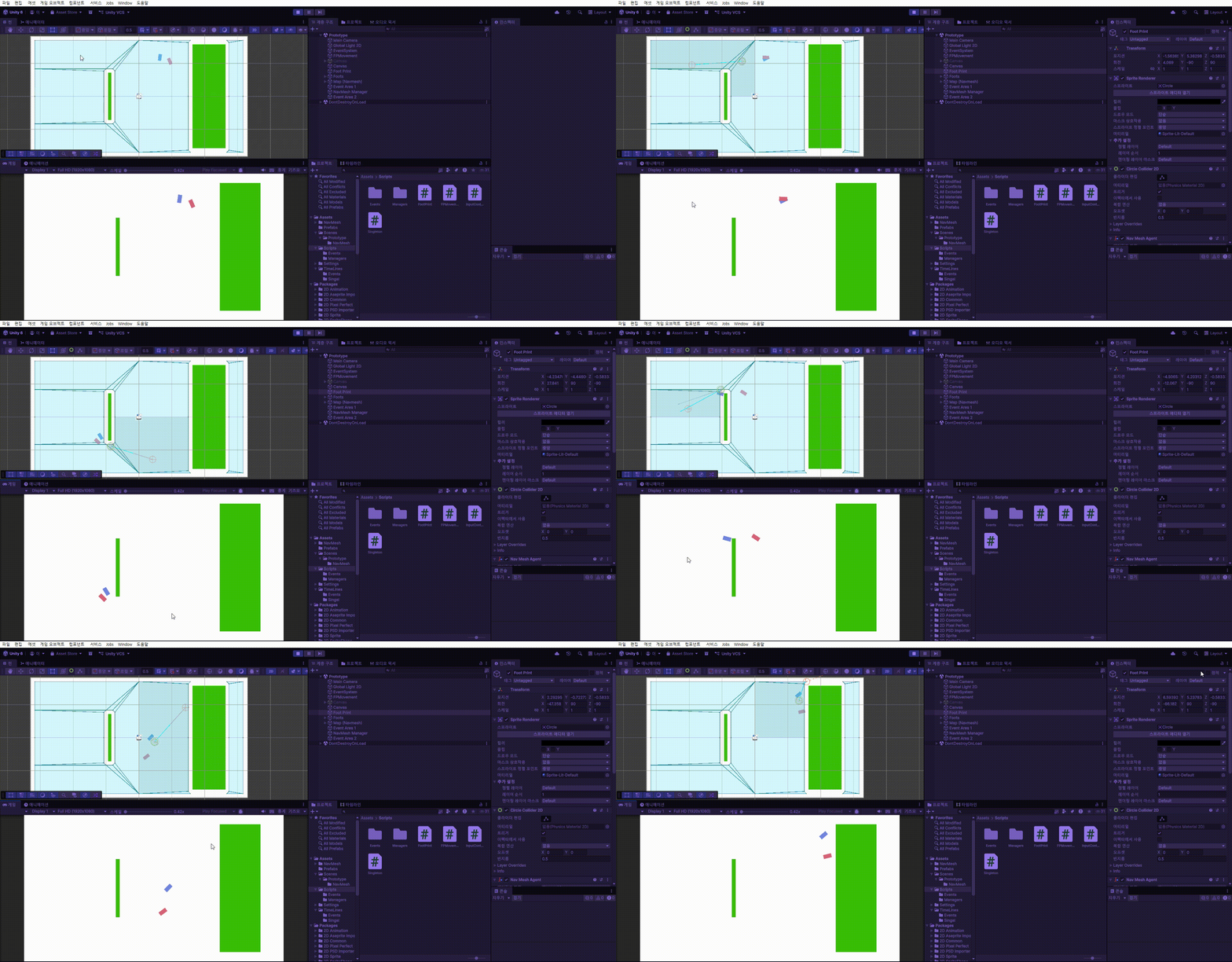
우선 간단하게, 속도가 빨라지는 함수와 느려지는 코드를 만들고 각각의 이벤트에 구독하여 사용해 주었다.
agent, 발걸음 속력이 변화하고, 이에 맞게, 발걸음 빠르기가 변화한다
Script Execution Order
위와 같이 사용했을 때, Awake와 OnEnable의 실행순서가 꼬여서 OnEnable에서 InputController를 가져오지 못하는 현상이 발생한다.

이를 해결하기 위해 Edit - Project Settings에서 Script Execution Order에 InputController를 추가하고, Default Time보다 더 빠르게 실행되게끔 잡아준다.
완성본
'GameDev > Step of Love' 카테고리의 다른 글
| Step of Love 미니게임 (0) | 2026.05.31 |
|---|---|
| Step of Love 카메라 제어 (0) | 2026.05.28 |
| Step of Love 이벤트 상호작용 (0) | 2026.05.26 |
| Step of Love - NavMesh (1) | 2026.05.25 |
| Step of Love 스토리텔링 (0) | 2026.05.24 |