3인칭 카메라의 회전에 따라서 플레이어 캐릭터가 회전하고, 그 회전에 따라서 로컬좌표계로 움직이는 코드를 구현한다.
완성본
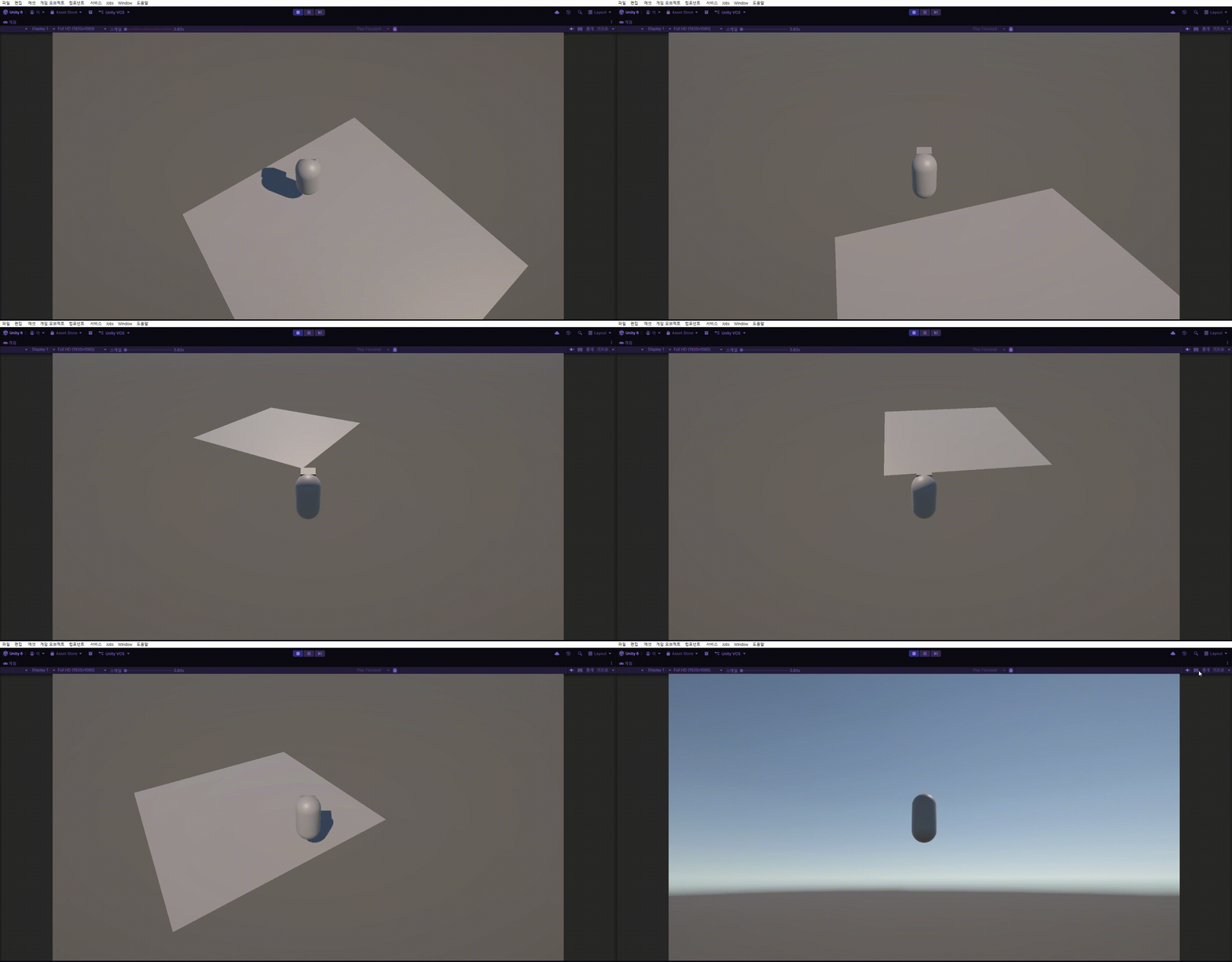
코드
카메라 회전에 따른 플레이어 회전
CameraMovement 스크립트
using UnityEngine;

public class CameraMovement : MonoBehaviour
{
    [SerializeField] PlayerMovement playerMovement;
    [SerializeField] Transform target;

    [SerializeField] float sensitivityX = 300;
    [SerializeField] float sensitivityY = 200;

    [SerializeField] float maxRotationY = 60;
    [SerializeField] float minRotationY = -30;

    [SerializeField] float distance = 10;


    private float yaw;
    private float pitch;
    // Start is called once before the first execution of Update after the MonoBehaviour is created
    void Start()
    {
        Cursor.lockState = CursorLockMode.Locked;
        Cursor.visible = false;
    }

    void LateUpdate()
    {
        yaw += Input.GetAxis("Mouse X") * sensitivityX * Time.deltaTime;
        pitch -= Input.GetAxis("Mouse Y") * sensitivityY * Time.deltaTime;

        pitch = Mathf.Clamp(pitch, minRotationY, maxRotationY);

        Quaternion rotation = Quaternion.Euler(pitch, yaw, 0);
        Vector3 offset = rotation * new Vector3( 0,0 , - distance);

        transform.position = target.position + offset;
        transform.rotation = rotation;
        playerMovement.OnRotate(yaw);
        // transform.LookAt(target);
    }
}
추가된 코드
    [SerializeField] PlayerMovement playerMovement;
    void LateUpdate()
    {
            playerMovement.OnRotate(yaw);
    }
PlayerMovement 변수를 생성해, 회전하는 함수를 PlayerMovement에서 실행되게끔 분리한다.
OnRotate함수에 yaw 값을 argument로 넘긴다. (float 파라미터)
yaw 값을 넘기는 이유는 마우스의 좌우 이동량에 따라 플레이어 캐릭터가 yaw 축으로 회전하기 위해서이다.
PlayerMovement 스크립트
using Unity.VisualScripting;
using UnityEngine;

public class PlayerMovement : MonoBehaviour
{
    InputManager inputManager;
    [SerializeField] float speed;
    Rigidbody rigidBody;
    private void Awake()
    {
        inputManager = GetComponent<InputManager>();
        rigidBody = GetComponent<Rigidbody>();
    }
    void FixedUpdate()
    {
        OnMovement();
    }
    void OnMovement()
    {
        rigidBody.MovePosition(rigidBody.position + inputManager.direction * speed *  Time.deltaTime);
    }
    public void OnRotate(float angle)
    {
        transform.rotation = Quaternion.Euler(0, angle, 0);
    }
}
추가된 코드
    public void OnRotate(float angle)
    {
        transform.rotation = Quaternion.Euler(0, angle, 0);
    }
받은 yaw 회전값을 플레이어 캐릭터의 회전값에 넣는다.
플레이어의 로컬좌표 이동
PlayerMovement 스크리터
using Unity.VisualScripting;
using UnityEngine;

public class PlayerMovement : MonoBehaviour
{
    InputManager inputManager;
    [SerializeField] float speed;
    Rigidbody rigidBody;
    private void Awake()
    {
        inputManager = GetComponent<InputManager>();
        rigidBody = GetComponent<Rigidbody>();
    }
    void FixedUpdate()
    {
        OnMovement();
    }
    void OnMovement()
    {
        Vector3 moveDir = transform.forward * inputManager.direction.z + transform.right * inputManager.direction.x;
        rigidBody.MovePosition(rigidBody.position + moveDir * speed * Time.fixedDeltaTime);
        // rigidBody.MovePosition(rigidBody.position + inputManager.direction * speed *  Time.deltaTime);
    }
    public void OnRotate(float angle)
    {
        transform.rotation = Quaternion.Euler(0, angle, 0);
    }
}
수정된 코드
void OnMovement()
    {
        Vector3 moveDir = transform.forward * inputManager.direction.z + transform.right * inputManager.direction.x;
        rigidBody.MovePosition(rigidBody.position + moveDir * speed * Time.fixedDeltaTime);
        // rigidBody.MovePosition(rigidBody.position + inputManager.direction * speed *  Time.deltaTime);
    }
moveDir 벡터에 새로 이동할 방향을 넣는다.
transform.forward에 앞뒤 입력값을 곱하고, transform.right에 좌우 입력값을 곱하여, 로컬좌표에서의 이동방향으로 바꾼다.
transform.forward와 transform.right는 오브젝트의 로컬 좌표계 방향이기 때문에 로컬 이동에 사용한다.
(참고로 transform.back, left, down은 존재하지 않기때문에 반대방향에 마이너스를 붙혀 사용한다.)
'Unity > Tutorial' 카테고리의 다른 글
| [Unity] Cinemachine (기초) (0) | 2026.02.24 |
|---|---|
| [Unity] Character Controller (3D) (0) | 2026.02.24 |
| [Unity] 1인칭 시점 카메라 (3D) (0) | 2026.02.22 |
| [Unity] 3인칭 시점 카메라 (3D) (0) | 2026.02.20 |
| [Unity] 플레이어 입력과 움직임 (3D) (0) | 2026.02.13 |