여러 버그나, 마음에 들지 않는 기능을 고칠 것이다. 이후 해상도 설정을 한다.
Y 0 미만 설치 불가
먼저 AI는 y가 0미만인 곳에는 생성이 불가능한데, 이를 플레이어 또한 똑같은 조건을 주기 위해, 플레이어도 y가 0미만이 곳에는 블럭을 생성할 수 없게 할 것이다.
CubeCreator
    bool CheckWorld(Vector3 dir, Transform cube, Caster caster) // 생성할 공간이 지정된 월드 내에 존재하는지 확인
    {
        Vector3 InsPos = cube.GetComponent<Block>().worldPosition + dir;
        if(Mathf.Abs(InsPos.x) > 50 || Mathf.Abs(InsPos.y) > 50 || Mathf.Abs(InsPos.z) > 50 || InsPos.y < 0)
        {
            Debug.Log("설치 공간이 영역을 벗어남");
            if(caster is InputController)
            {
                UIManager.Instance.WarningUI("Outside build area.");
            }
            return true;
        }
        else
        {
            return false;
        }
    }
CheckWorld 함수에서 생성위치의 y가 0 미만일 때의 조건을 추가해서 설치를 막는다.
대포 인식 버그
대포가 가장 가까운 큐브를 공격하지 않는 버그가 있기 때문에 이를 수정해준다.
  IEnumerator FireBall()
  {

      Vector3 center = transform.position + standardDir * 5;
      Vector3 halfExtent = new Vector3(3, 3, 5);
      Quaternion orientation = Quaternion.Euler(standardDir.y * 90, standardDir.x * 90, 0);
      InsRangeCube(center, orientation);
      while (true)
      {
          yield return new WaitForSeconds(attackDelay);

          Collider[] hits = Physics.OverlapBox(center, halfExtent, orientation, LayerMask.GetMask("Cube"));


          // GameObject prefab = Instantiate(debugCube);
          //
          // prefab.transform.position = center;
          // prefab.transform.rotation = orientation;
          // prefab.transform.localScale =  new Vector3(3,3,5) * 2;

          float bestDistance = 100;

          foreach (Collider collider in hits)
          {
              Cube cube = collider.GetComponent<Cube>();

              if (cube != null && myCaster != cube.myCaster) // 대상이 큐브이고, 자신과 시전자가 다르다면
              {
                  float distance = (cube.transform.position - transform.position).magnitude;
                  Debug.Log($"distance : {distance}");
                  if (bestDistance > distance)
                  {
                      bestDistance = distance;
                      target = cube;
                  }
                  Debug.Log(collider.name + " 거리 : " + distance);
              }
              ~~~~~~~~~~~~중략~~~~~~~~~~
          }

      }
  }
bestDistance를 반복문 밖에서 선언하여 계속 초기화 되지 않게 하는것이 핵심이였다.
카메라 회전 버그
카메라가 타겟이 변경되어 움직이는 중일 때, 게임이 종료되면 isMoving이 계속 true로 남아있어, 다음 게임 시작때, 바로 카메라를 회전하지 못하는 버그가 존재했다.
    void gameStartCam()
    {
        SetPlayingCamera();
        ChangeCamera(playingCam);

        // pitch = transform.rotation.eulerAngles.x;
        // yaw = transform.rotation.eulerAngles.y;

        Vector3 currentRotation = controllCam.transform.rotation.eulerAngles;
        pitch = currentRotation.x;
        yaw = currentRotation.y;

        Quaternion rotation = Quaternion.Euler(pitch, yaw, 0);
        offset = rotation * new Vector3(0, 0, -distance);

        isMoving = false;

    }
게임 시작할 때 isMoving을 false로 바꾸어 바로 카메라를 회전할 수 있게끔 수정해주었다.
플레이어 자원량 시작 버그
플레이어의 기초 자원량이 게임을 시작했을 때, 가장 최근의 판에서 가지고 있던 자원량을 가진채 시작하는 버그가 있었다.
    protected override void Start()
    {
        base.Start();
        Debug.Log($"totalResource : {totalResource}");
        totalResource = StatManager.Instance.startResource;
        GameManager.Instance.gameStart += () => totalResource = StatManager.Instance.startResource;
    }
게임이 시작될때 호출되는 gameStart 델리게이트에 람다식으로 코드를 넣어 수정해주었다.
CameraMovement
게임이 시작될 때, OrthographicSize이 변경된채 블렌딩 되는 버그가 이썽ㅆ다.
    void SetPlayingCamera() // 게임 카메라 초기값 세팅
    {
        pitch = tempRotation.x;
        yaw = tempRotation.y;

        Quaternion rotation = Quaternion.Euler(pitch, yaw, 0);
        offset = rotation * new Vector3(0, 0, -distance);

        playingCam.transform.position = target.position + offset;
        playingCam.transform.rotation = rotation;
        playingCam.Lens.OrthographicSize = 9;

        zoom = 0;
    }
플레잉 카메라로 바뀔 때, 호출되는 함수에 OrthographicSize를 기본값인 9로 맞춰주었다.
적 자원량 긴급 보충
적의 자원생산자가 존재하지 않고, 자원량이 20미만이 되면 아무것도 할수 없는 상태가 되기 때문에, 블럭을 생성하기 전에 20 미만이라면 자원량을 20으로 맞춰주는 기능을 만들 것이다.
    void ChoicePosition(EnemyAction action) // 설치할 위치를 잡는 함수
    {
        // Transform StandardCube = haveCube[Random.Range(0, haveCube.Count)].transform; // 생성시킬 큐브의 기준

        AddResource();
        ~~~~~~~~~~~중략 ~~~~~~~~~~~~~
    }
    private void AddResource() // 자원량이 부족할 때 보충하는 함수
    {
        if(totalResource < 20)
        {
            totalResource = 20;
        }
    }
AddResource라는 함수를 위치 점수 생각 전에 자원량을 보충해준다.
제약 클릭 실수
게임이 끝나고 바로 제약을 눌러버리는 경우가 잦기 때문에, 버프 내용이 나온이후 클릭이 가능하도록 할 것이다.
ConstraintButton
    private Button myButton;
    private void Awake()
    {
        myButton = GetComponent<Button>();
    }
    public void DataSetUp()
    {
        myButton.interactable = false;
        StartCoroutine(typeSentence(buffData.sentence, nuffData.sentence));
        // myText.text = myData.sentence;
    }

    IEnumerator typeSentence(string sentence, string sentence2)
    {
        buffText.text = "";
        nuffText.text = "";

        foreach (char c in sentence)
        {
            buffText.text += c;
            yield return new WaitForSecondsRealtime(0.05f);
        }
        myButton.interactable = true;
        foreach (char c in sentence2)
        {
            nuffText.text += c;
            yield return new WaitForSecondsRealtime(0.05f);
        }
    }
Button 컴포넌트의 Interactable을 비/활성화 해주면서 클릭미스를 해결한다.
수정본
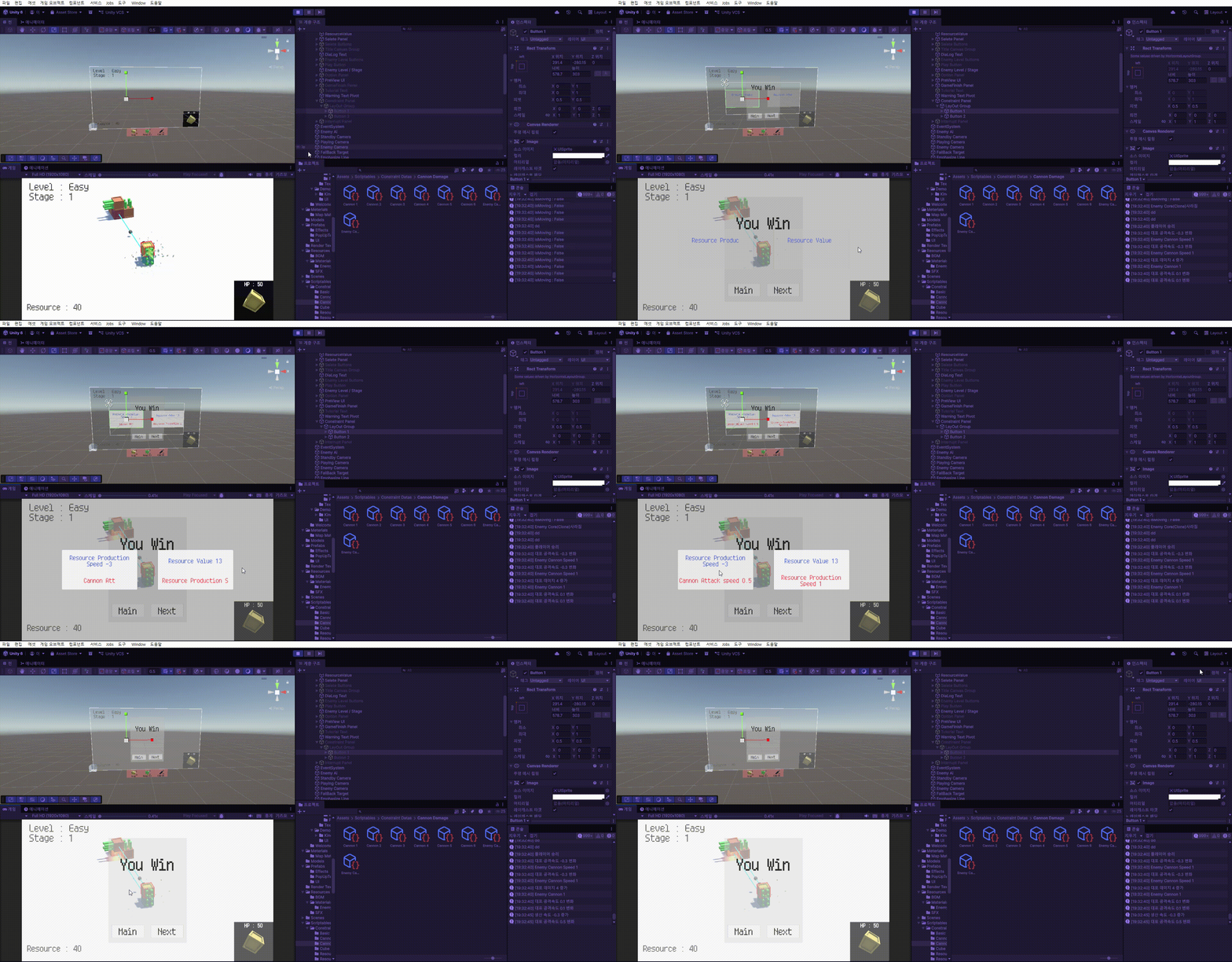
해상도 조절하기
해상도에 따라 UI가 이상하게 변하지 않고, 현재 그대로 유지시키기 위해서 캔버스의 설정을 건드려줘야한다.
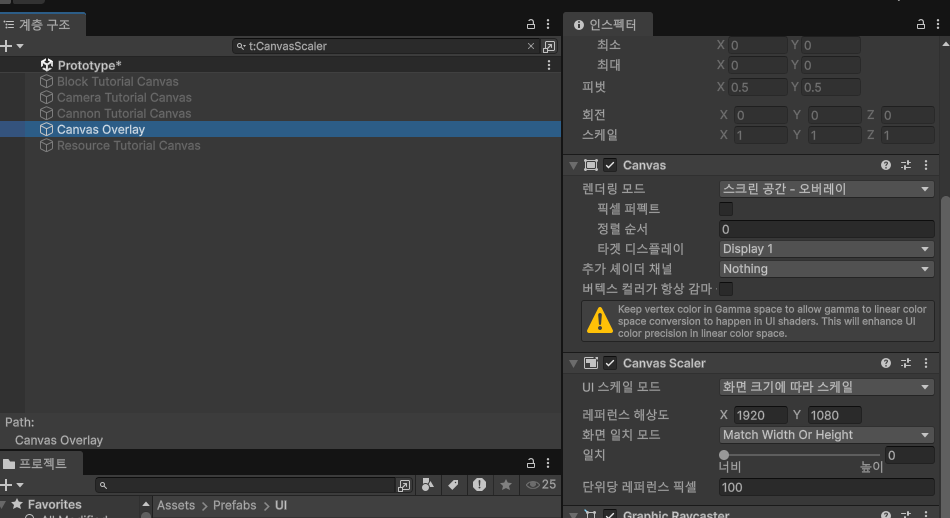
Canvas Scaler에서 Scale with Screen Size로 하여 현재 사용하는 게임씬의 해상도인 1920 x 1080으로 맞춰준다.
이렇게 해상도 기준을 만들면 해상도가 달리지는 상황에서 기준 해상도로부터의 비율로 UI 크기를 맞춰준다.
'GameDev > Cubidom' 카테고리의 다른 글
| Cubidom - 게임 출시 (0) | 2026.05.19 |
|---|---|
| Cubidom - 프로젝트 빌드 (0) | 2026.05.16 |
| Cubidom - AI의 제약 시스템 (0) | 2026.05.09 |
| Cubidom - 제약 시스템 (0) | 2026.05.07 |
| Cubidom - AI 시스템 보완 (Utility AI) (0) | 2026.05.03 |